A real Mac app, not a website in a costume.
Swift and SwiftUI, a non-activating panel that borrows the keyboard the way Spotlight does, Liquid Glass on macOS Tahoe, real menus everywhere else — and WidgetKit widgets that are actually widgets.
Iqamah 2 · for macOS
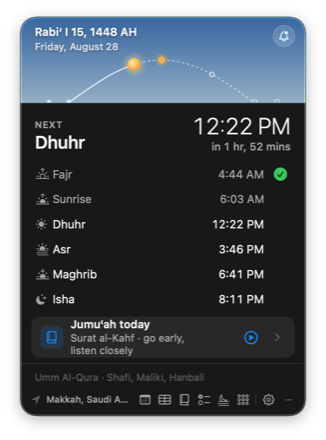
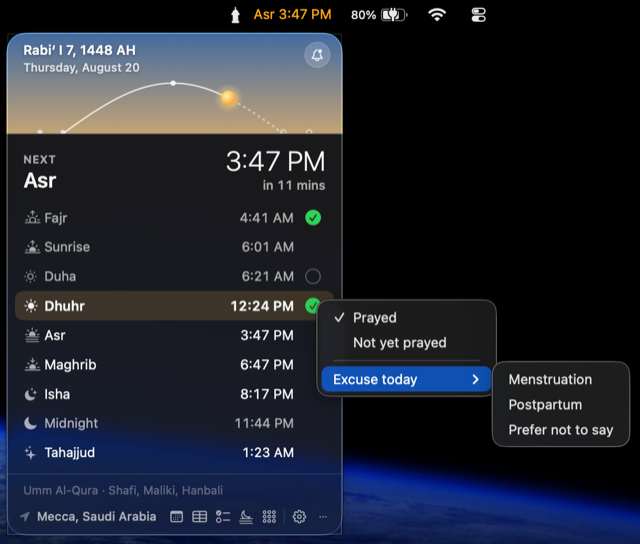
One click in the menu bar opens the new panel: the sky as it is right now over your city, drawn from your own prayer times — the sun on its arc, the next prayer marked in gold, and Mark prayed a keystroke away. Prayer times and the adhan are free, forever.
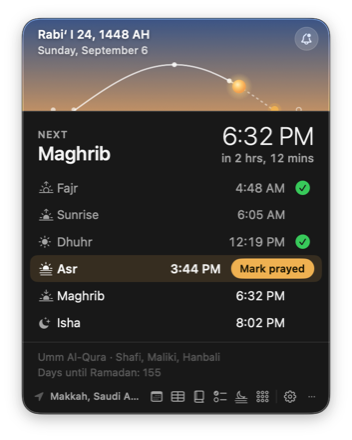
This is the app’s real behaviour: the sky, the sun and the face all come from the day’s own prayer times. Times shown are Makkah’s, by Umm al-Qura.
Swift and SwiftUI, a non-activating panel that borrows the keyboard the way Spotlight does, Liquid Glass on macOS Tahoe, real menus everywhere else — and WidgetKit widgets that are actually widgets.
Prayer times, the adhan, the panel with both faces, the habit tracker, the fasting record — and now the whole Quran: the reading, the recitation in either voice, the notes you write on it, the downloads. Pro is for the deeper tools, priced once, like a tip.
Location is used to compute times and goes nowhere. Sync, if you turn it on, writes a file to a folder you choose in iCloud Drive. The reason behind an excused day never leaves the Mac at all.
New in 2.6, grown through 2.11 · Free for everyone
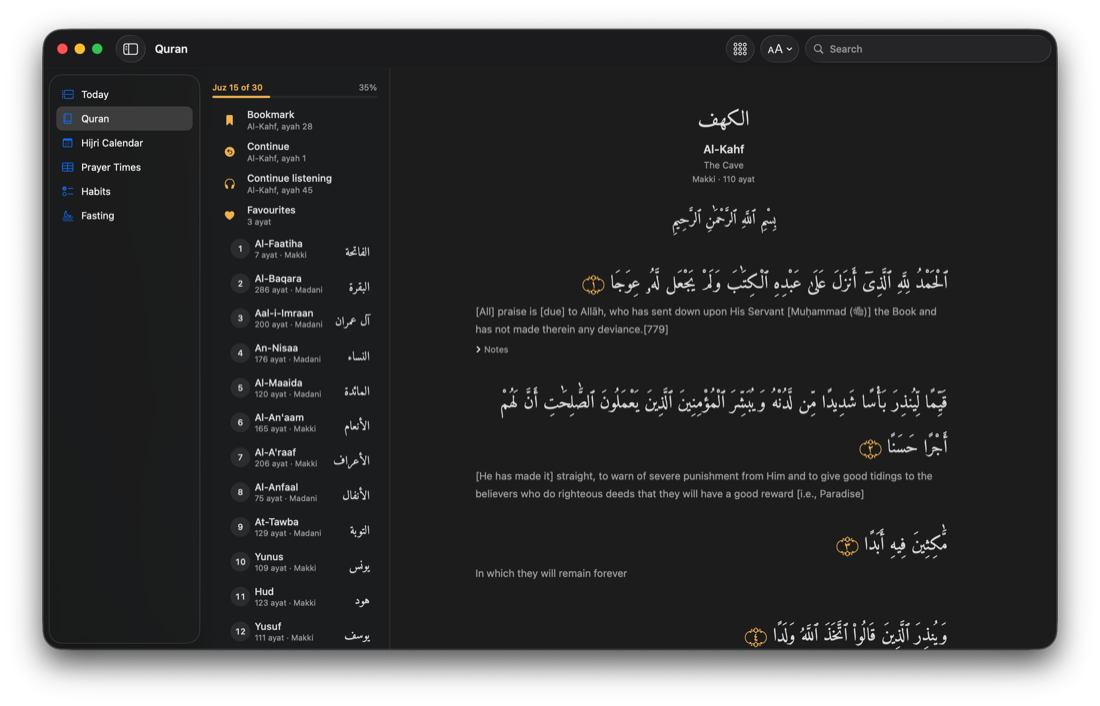
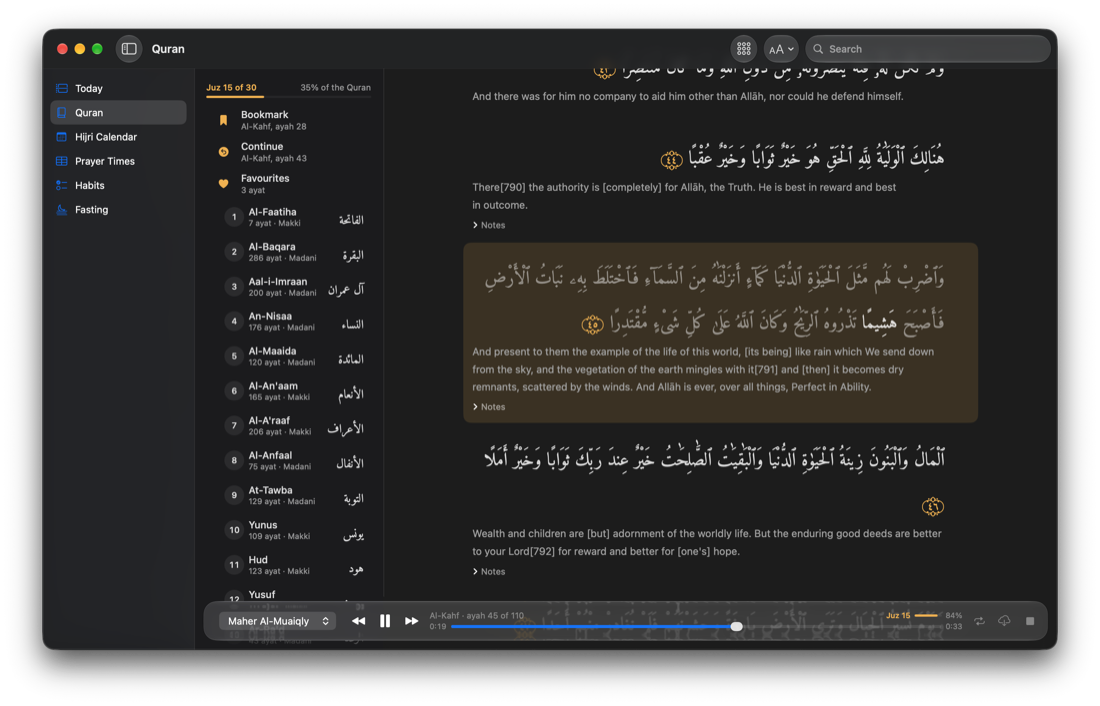
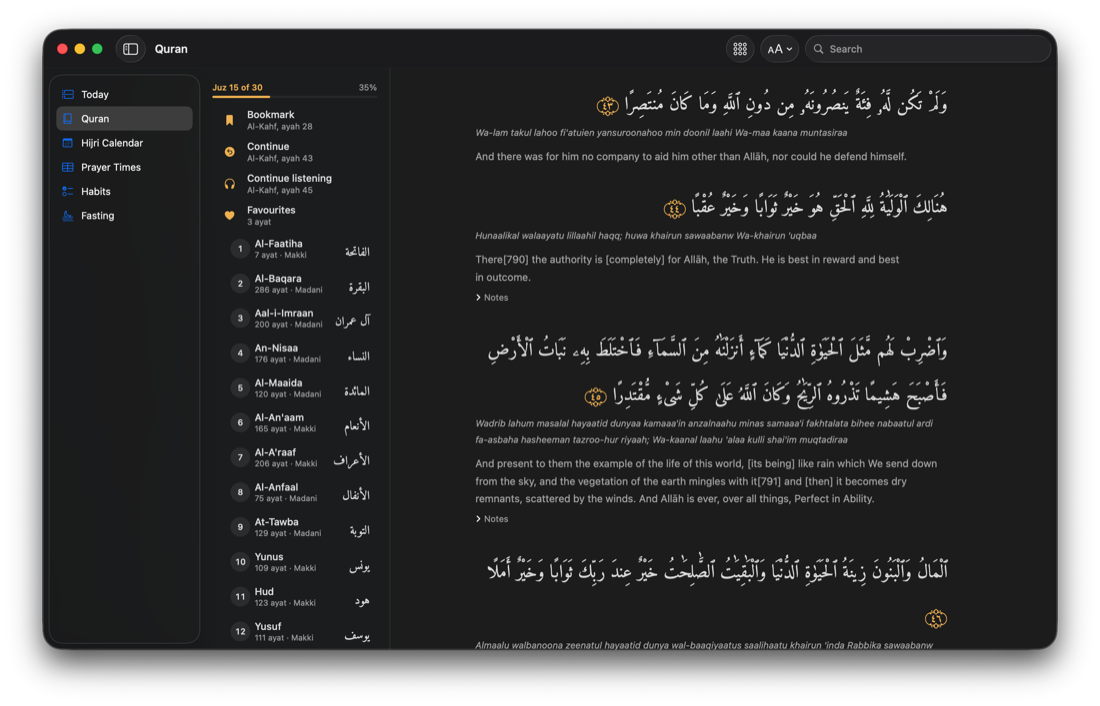
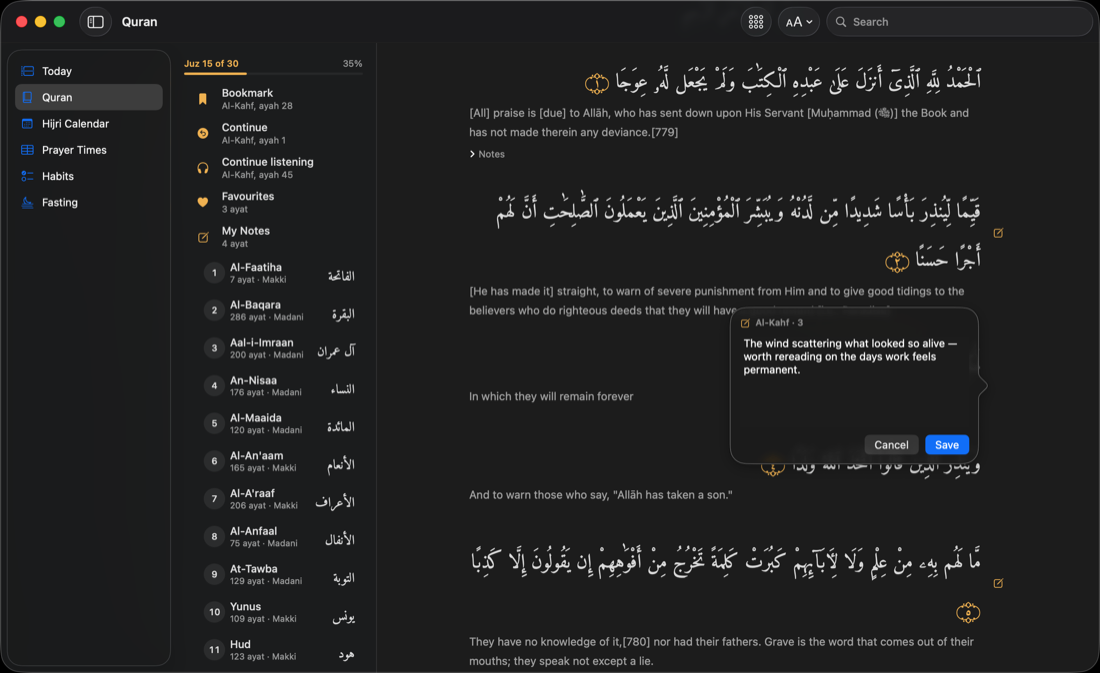
A customer wrote that she was tired of leaving for YouTube every time she wanted to hear a surah — the Quran belonged inside the app her day was already built around. So 2.6 is the Quran: all 114 surahs in the mushaf’s own Uthmani script, recited ayah by ayah — and every part of it free. Then she read it for a month and wrote back, and 2.7 is her review answered: a second voice, the thirty juz with a khatmah record to match, a note on any ayah, and a recitation that no longer stops when you look away. She kept writing. 2.8 put a transliteration line under the Arabic, and 2.9 is the fourth thing she asked for: the word being recited is the word you are looking at, in either voice. 2.11 answers her fifth letter: a count of the hasanat in what she has heard, and a player that belongs on the new macOS.
New in 2.11
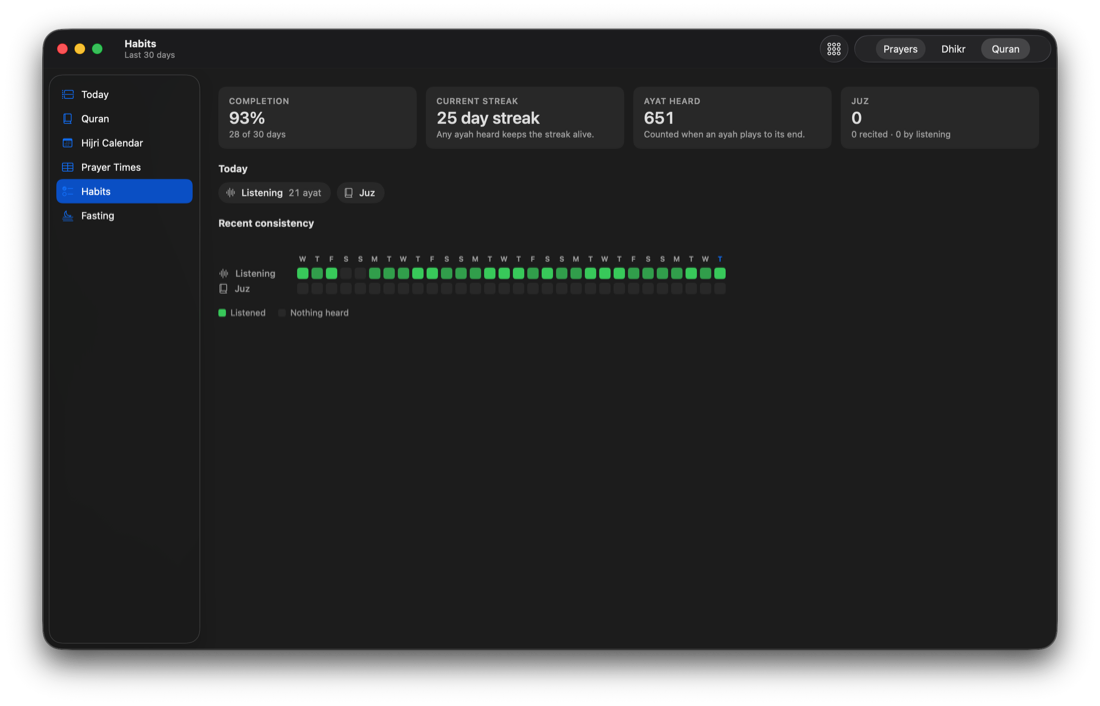
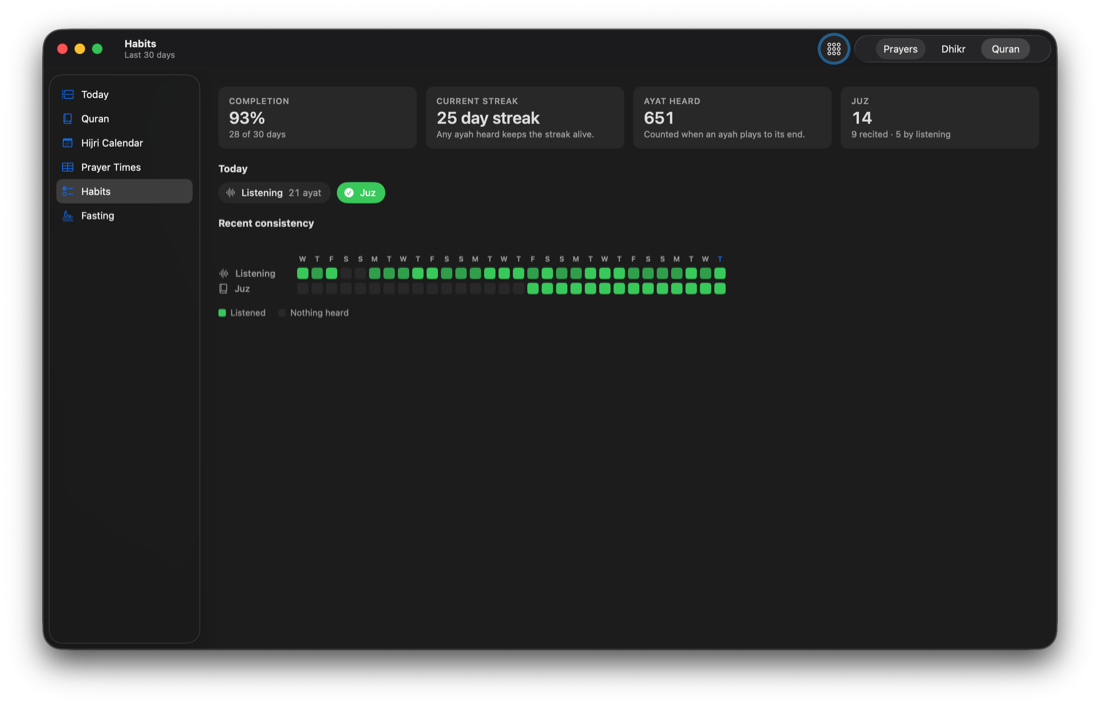
“Whoever recites a letter from the Book of Allah has a good deed, and the good deed is multiplied by ten.” After that hadith, in Jami‘ at-Tirmidhi, Habits counts ten for every letter of the Quran you hear to the end of its ayah, and for every letter of each juz you mark as recited. It sits beside Ayat heard and Juz, over the same thirty days, and it is free like the rest of the Quran.
The panel
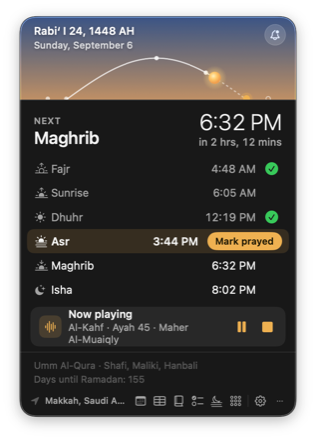
Left click opens the panel; the classic menu is still a right-click away. The panel takes your keyboard without stealing your focus — the app you were in stays front, and gets its focus straight back.
Two faces
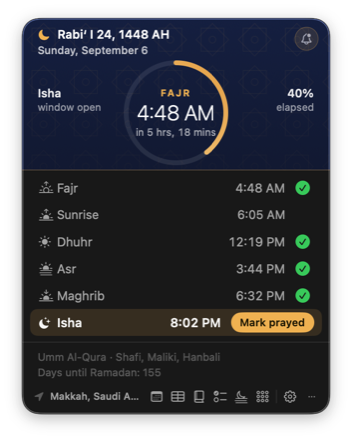
After Isha the panel wears its night face: navy, a lattice, and a ring that fills as the night runs toward Fajr. Let it follow the day, or pin either face in Settings › Appearance.
One window
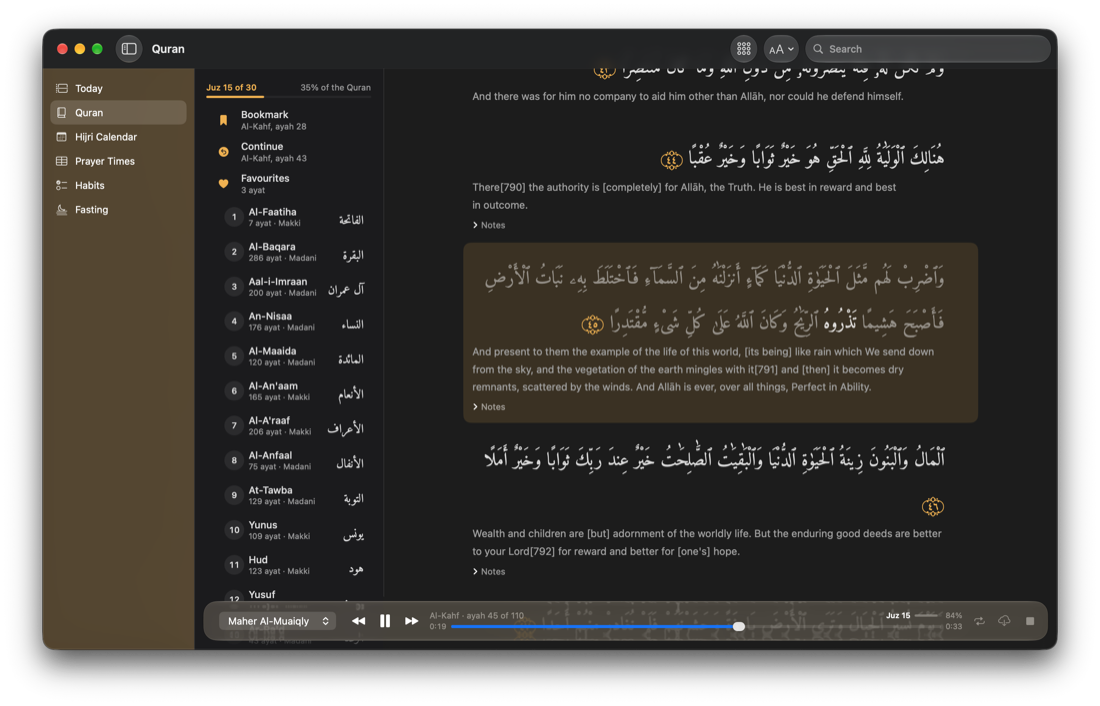
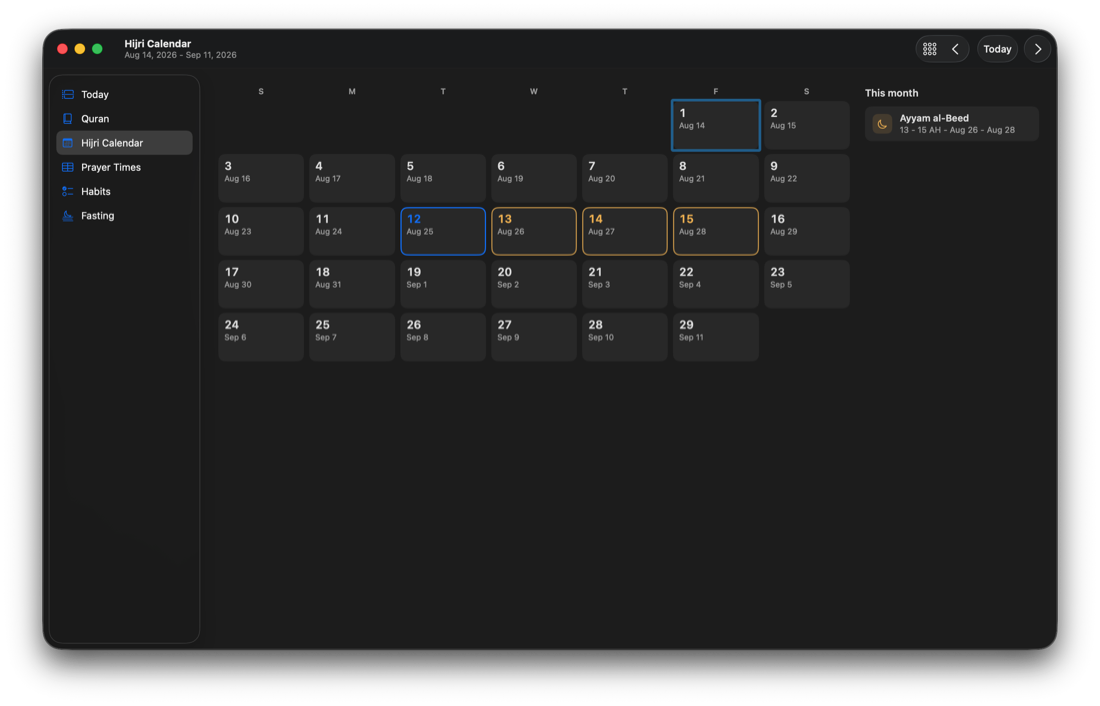
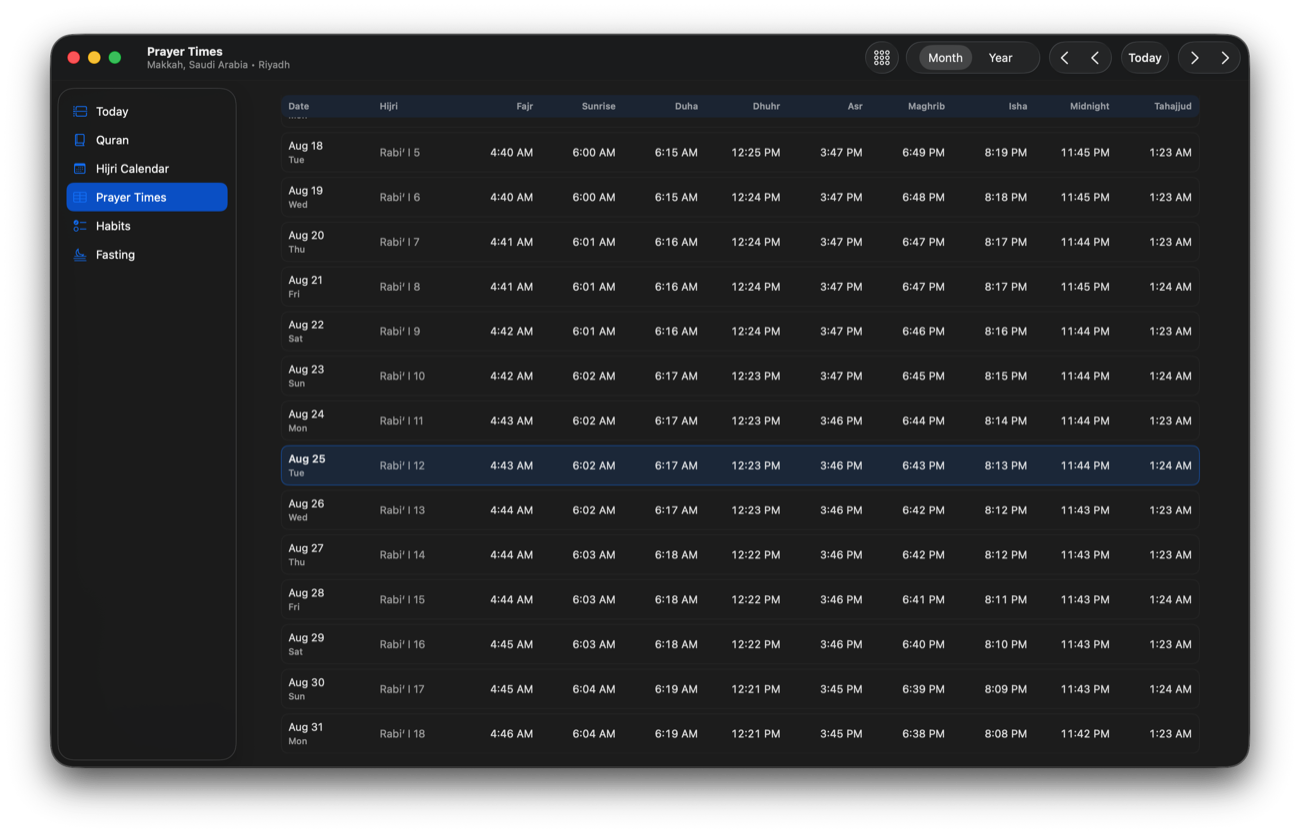
Today, the Quran, the Hijri calendar, the prayer tables, Habits and Fasting are sections of a single window with a sidebar — the way a Mac app is supposed to feel.
New in 2.12
On the new macOS the window’s sidebar, the Quran player and the menu bar panel are Liquid Glass. Settings › Appearance now has a section for it: a tint of None, Gold or Accent — your Mac’s accent colour — and an Intensity slider that runs from Subtle to Vivid, like Sky intensity. Until you move either, the glass looks exactly as it did.
New in 2.10
Two cards joined Today, drawn from the same prayer times as everything else on the screen — so they move with your location, your calculation method and your own per-prayer adjustments. Each has its own switch in Settings › Prayer Times, under Today; both start on, and turning one off leaves nothing behind on the page.
While the sun rises, while it stands at its zenith, and while it sets. In those three, prayer is not offered at all. The two long spans are a different thing: there it is voluntary prayer that is discouraged, and only once you have prayed that window’s obligatory prayer — which is what the window is for.
Those two rows name a condition because the ruling does. Iqamah knows when the window opened. It does not know when you prayed — and an app should not print a time it cannot know.
Two before Fajr, four before Dhuhr and two after, two after Maghrib, two after Isha. The ones that come after sit past the end of that prayer’s own slot in the day planner rather than on its adhan, so the row is a time you could actually pray it. Asr carries none, deliberately: this is the confirmed set. Duha and Tahajjud join the card only if you already have their rows turned on.
Excused days
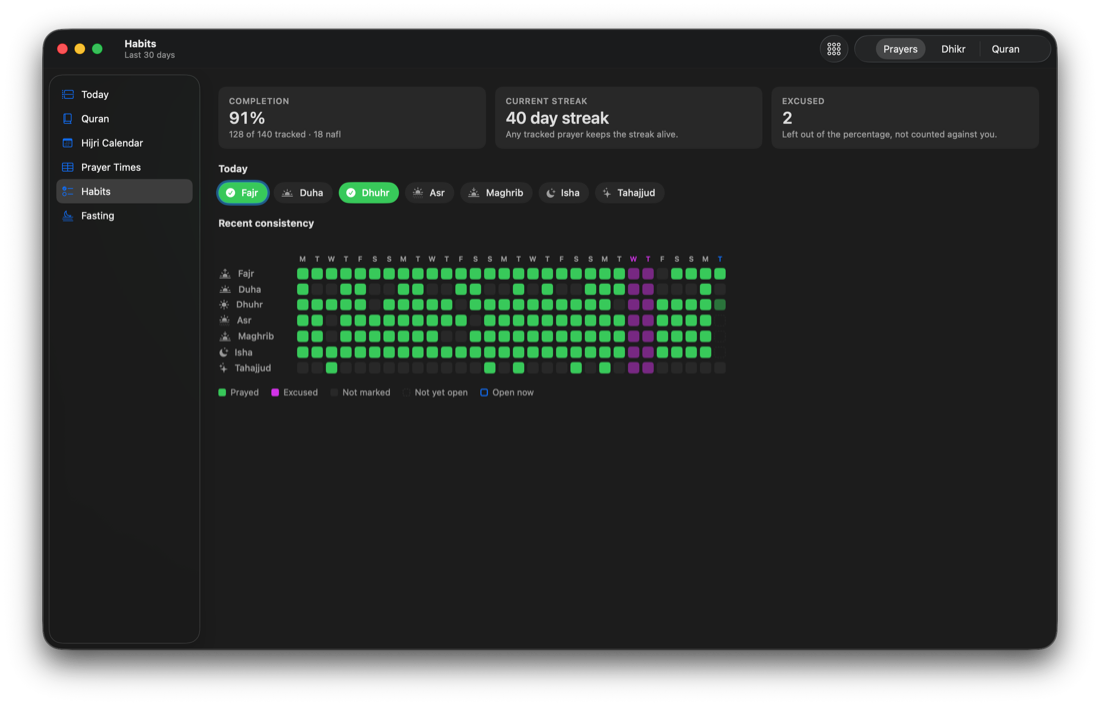
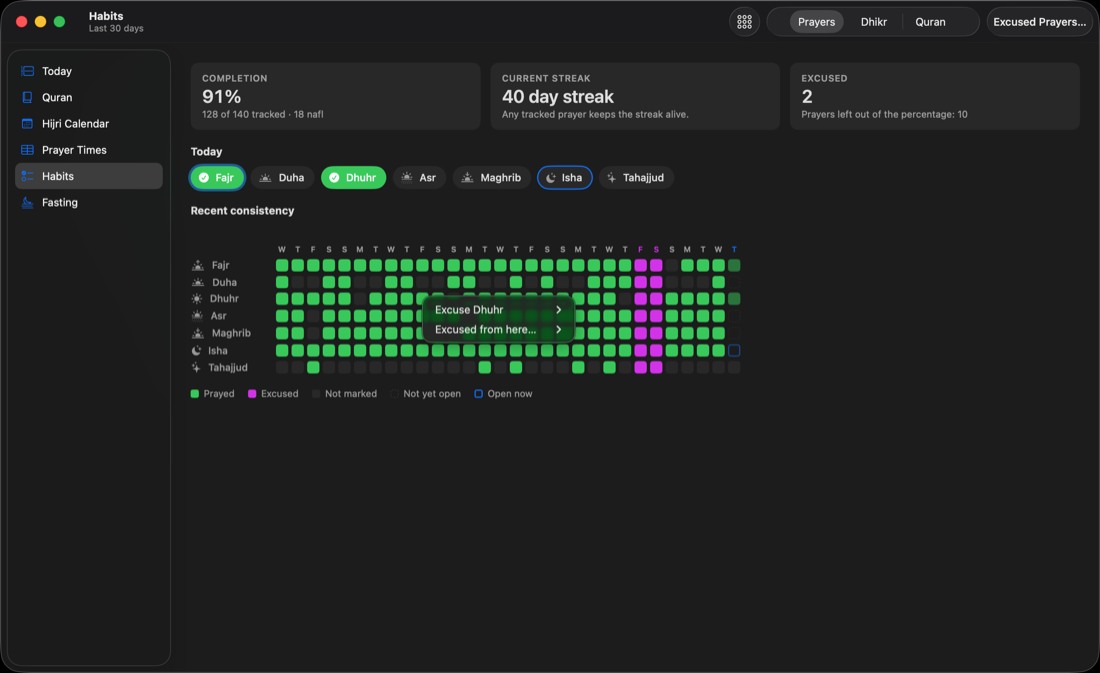
Mark a day you were not required to pray, and Iqamah stops counting it against you. The day leaves your percentage entirely — instead of sitting there as five prayers you “missed” — and your streak carries straight across it. Since 2.8 an excusal is about a prayer: right-click any square and excuse that one alone, or choose Excused from here… and click the last one, and your percentage counts only the prayers that were actually due. In 2.10 the way back out matches the way in: right-click any square on an excused day — Duha and Tahajjud included — and The whole day is not excused clears it at once.
It used to need Pro. But the habit tracker is where excused days are marked, and a purchase prompt is the wrong thing to meet somebody with at that moment. So in 2.0 it’s free — for everyone, forever. Fasting, too.
The field
The other Mac menu bar apps tell the time and stop. The one worship tracker has no Mac identity at all. Iqamah is the only one that is both — and the only one with a funded promise to still work next macOS.
| As of September 2026 | Iqamah 2.12 | Sacred | Guidance | Prayer Times | Sajda |
|---|---|---|---|---|---|
| Mac menu bar app | ✓ | — iOS-first port | ✓ | ✓ | ✓ |
| Prayer panel with a live sky | ✓ 2.0’s two faces | — | — | — | — |
| Prayer & fasting tracking | ✓ free | ✓ | — | — | — |
| Quran reader with recitation | ✓ free · offline · two voices · word by word | — | — | — | — |
| Excused days that don’t break streaks | ✓ or a single prayer | — | — | — | — |
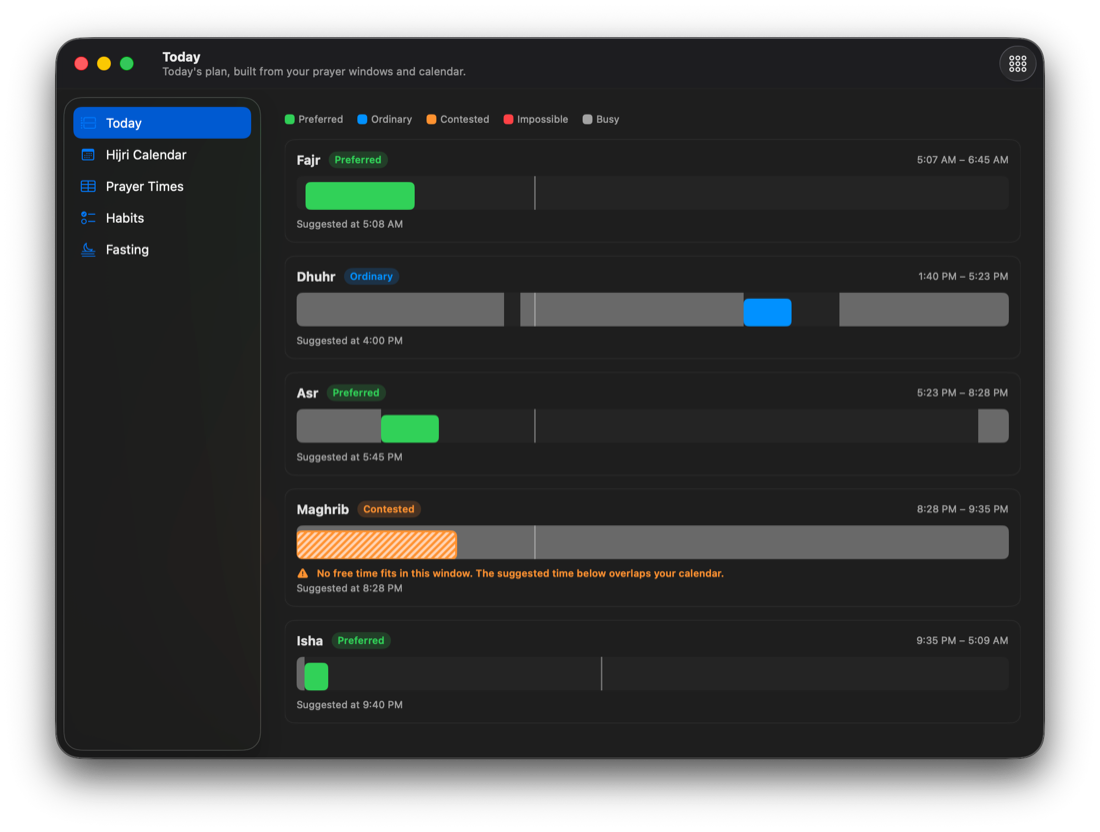
| Day planner around prayer windows | ✓ Pro | — | — | — | — |
| Hijri calendar with events | ✓ | — | date only | date only | — |
| Widgets · Shortcuts · Siri | ✓ | widgets only | — | — | — |
| Sync across Macs | ✓ your iCloud folder | CSV export | — | — | — |
| Languages | 18 full RTL | 1 | 3 | 4 | 3 |
| Signed, notarized, auto-updating | ✓ | ✓ | ✓ | — Gatekeeper override | partial |
Feature sets as published by each project in August 2026: Sacred Worship Tracker (App Store), Guidance (Mac App Store), tareq1988/prayer-times-macos and ikoshura/Sajda (GitHub). Corrections welcome at support@stacknscope.com.
Pricing
Pro exists so Iqamah is still maintained next Ramadan — one payment, three Macs, no subscription.
Your licence key arrives by email. Open Iqamah, go to Settings › Pro, then Activate License. Works on three Macs, and there’s a 7-day free trial in the app — no card required.
Can’t afford it? Email us and we’ll send you a licence — no questions, no proof needed.
Built for the whole year
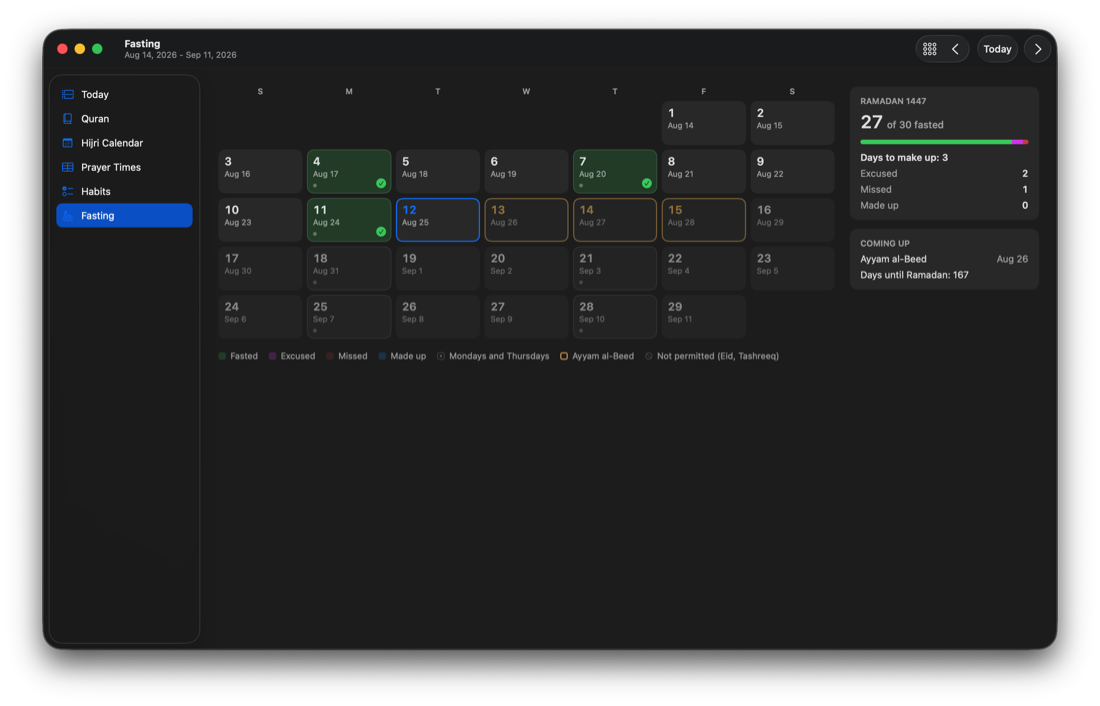
Days excused or missed during Ramadan become days to make up. Iqamah counts what’s owed, takes one off when you repay it, and tells you how long until the next Ramadan — and it never confuses a Monday you fasted for its own sake with a debt you’re repaying, unless you say so.
Ramadan, counted. Fasted, excused and missed — each day knows what it was.
The qada ledger. Mark a fast as a make-up and the count comes down. Your call, never the app’s guess.
Time to repay, visible all year — not a surprise the week before. Since 2.10 it is in the menu bar panel too, where you already are when you mark a prayer, and it takes itself away for the whole of Ramadan.
Quietly done properly
Arabic, Urdu, Farsi, Bengali, Hausa and more — the panel’s arc runs right-to-left, and even the calculation methods read in your language.
Every row reads “Fajr, 4:41 AM, prayed.” With VoiceOver on, the click routes to the fully accessible menu automatically.
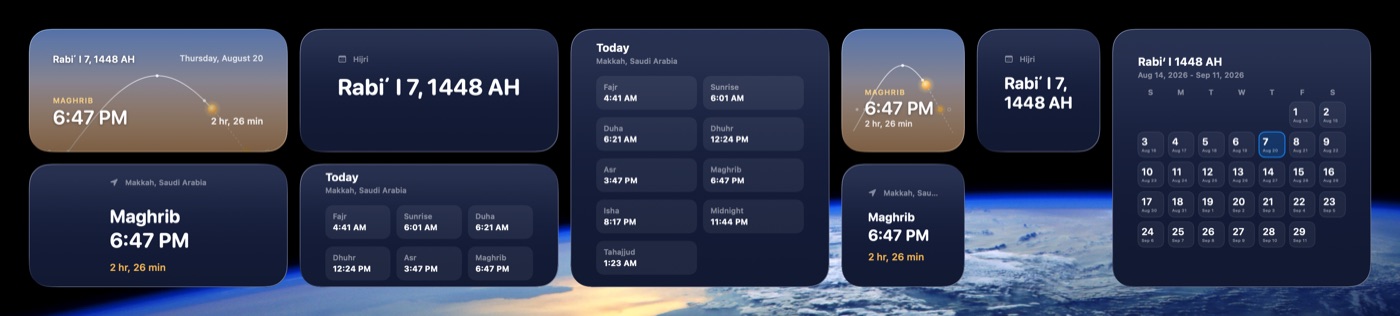
Next prayer with a countdown, today’s times, the Hijri month — real WidgetKit, small, medium and large.
“What prayer window is open?” · “I prayed, Iqamah.” Three actions to build your own automations on — all free.
Amber at your warning threshold, red in the last stretch. One setting, two steps.
The overlay shows the sky at that prayer’s moment — and can record the prayer, or remind you in ten minutes.
One page says what Iqamah believes — location, method, permissions, next alert — with a button beside anything wrong.
Developer ID and notarized by Apple; updates arrive on their own. No Gatekeeper incantations, ever.
Questions
Two things for the new macOS, and a round of fixes for anyone who uses light mode. Settings › Appearance has a Liquid Glass section now: a tint of None, Gold or Accent — your Mac’s accent colour — and an Intensity slider from Subtle to Vivid, like Sky intensity. It reaches the window’s sidebar, the Quran player and the menu bar panel, but most of the colour goes on the sidebar; the player and the panel take only a little, so their text stays easy to read. Until you change it, the glass looks exactly as it did. And a thin line now runs between the sidebar and the section beside it. The sidebar is glass, and the section carries on underneath it, so the two used to meet a shade apart with no edge — beside the Quran’s surah list, a list next to a list, they read as one. The fixes: the panel’s glass now follows your Mac between light and dark, where it used to keep the shade it first opened with until Iqamah quit; the selected section’s icon no longer disappears into the accent colour when the sidebar has the keyboard focus; in light mode the PRO badge, the white days in the Hijri calendar and Fasting, and the moon beside them are a darker gold you can actually read; and on the Lantern the alert bell is gold rather than black on navy. 2.12.1 fixes the bell on the Horizon too: there it sat on a faint white disc over the sky, so in dark mode the bell was hard to see, and during the adhan the white Stop button that takes its place could hardly be read in light mode. The disc is the Lantern’s navy now, with the bell and the Stop button white on it, like the date beside them — though with Sky intensity turned well down toward Subtle, the sky pales in light mode, and white on the disc can be hard to see. The details are in the changelog.
A fifth letter from the reader whose first one became the Quran section, and 2.11 carries all of it. Habits, under Quran, now counts hasanat: ten for every letter of the Quran you hear to the end of its ayah, and for every letter of each juz you mark as recited, after the hadith in Jami‘ at-Tirmidhi. The recitation player is one row now, with the juz you are in beside the ayah’s name, and on macOS 26 and later it floats in Liquid Glass a little above the bottom of the window, with the Quran scrolling on beneath it. The line above the surah list now says its percentage is of the whole Quran. Two faults you may have noticed without knowing why. On Fridays, the gold border around the Friday Focus hadith redrew itself every frame from the moment the window opened until Iqamah quit — which is why macOS sometimes listed Iqamah as using significant energy; it now costs next to nothing, and looks the same. And when your Mac could not find its location at the first attempt, Settings showed “kCLErrorDomain error 0” and gave up; it now keeps trying for up to thirty seconds, and if it still cannot, says what happened in plain words, in your language. In French, Russian and Portuguese, and in places in six other languages, a surah’s Arabic name is now drawn whole. The details are in the changelog.
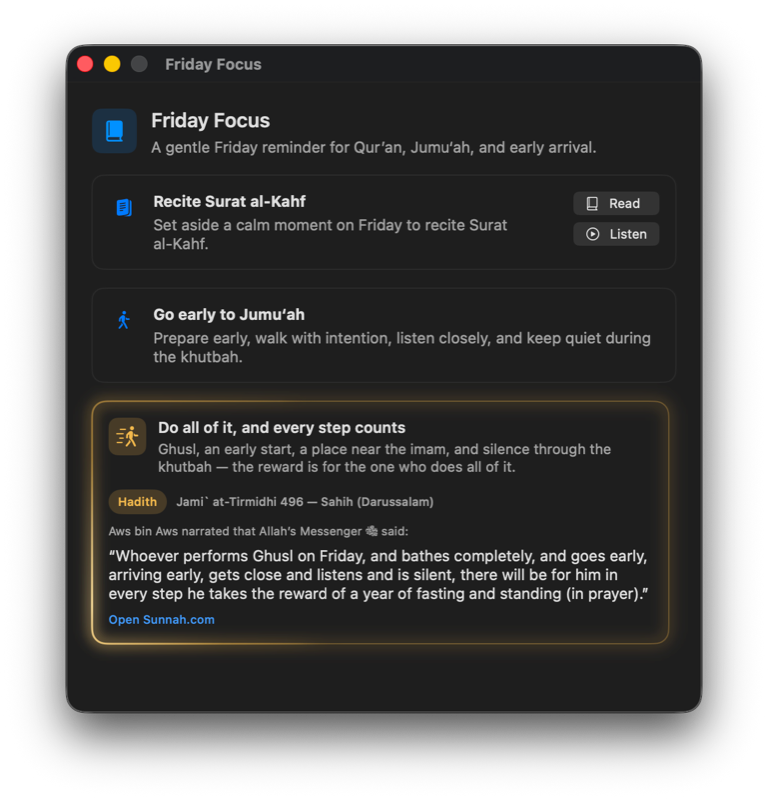
Another letter from the reader whose first one became the Quran section, this time about the day rather than the Quran. The Today page carries two new cards. The first names the five times prayer is not offered: three are the sun’s own — while it rises, while it stands at its zenith, while it sets — and in those it is not offered at all; the other two are long spans, where it is voluntary prayer that is discouraged, and only once you have prayed that window’s obligatory prayer. The second lays out the twelve rak‘ah at the times they belong to: two before Fajr, four before Dhuhr and two after, two after Maghrib, two after Isha. Each has a switch in Settings › Prayer Times, under Today. The Ramadan countdown, which lived in the Fasting tab, is in the menu bar panel now as well — that is where you are when you mark a prayer. Two faults went with it: an excused day can now be undone from the Duha and Tahajjud squares, which used to open an empty menu, and today’s prayer chips no longer draw as buttons while the day is excused. The details are in the changelog.
The fourth thing the reader who wrote those letters asked for: to see the words light up as they are recited. Press play in the Quran reader and the word being recited stays at full strength while the rest of the ayah steps back, moving as the reciting moves; when Sheikh Maher Al-Muaiqly goes back to repeat a phrase, the highlight goes back with him. Both voices have it. His timings were published for his recording and checked against ours word by word; none existed for Sheikh Ali Al-Hudhaify, so they were measured from his recording, every word of every ayah. Nothing to turn on. Also, ⌘F in the Quran window finally puts the cursor in the search field, and with “continue into the next surah” on, the reader turns the page when the recitation does. The details are in the changelog.
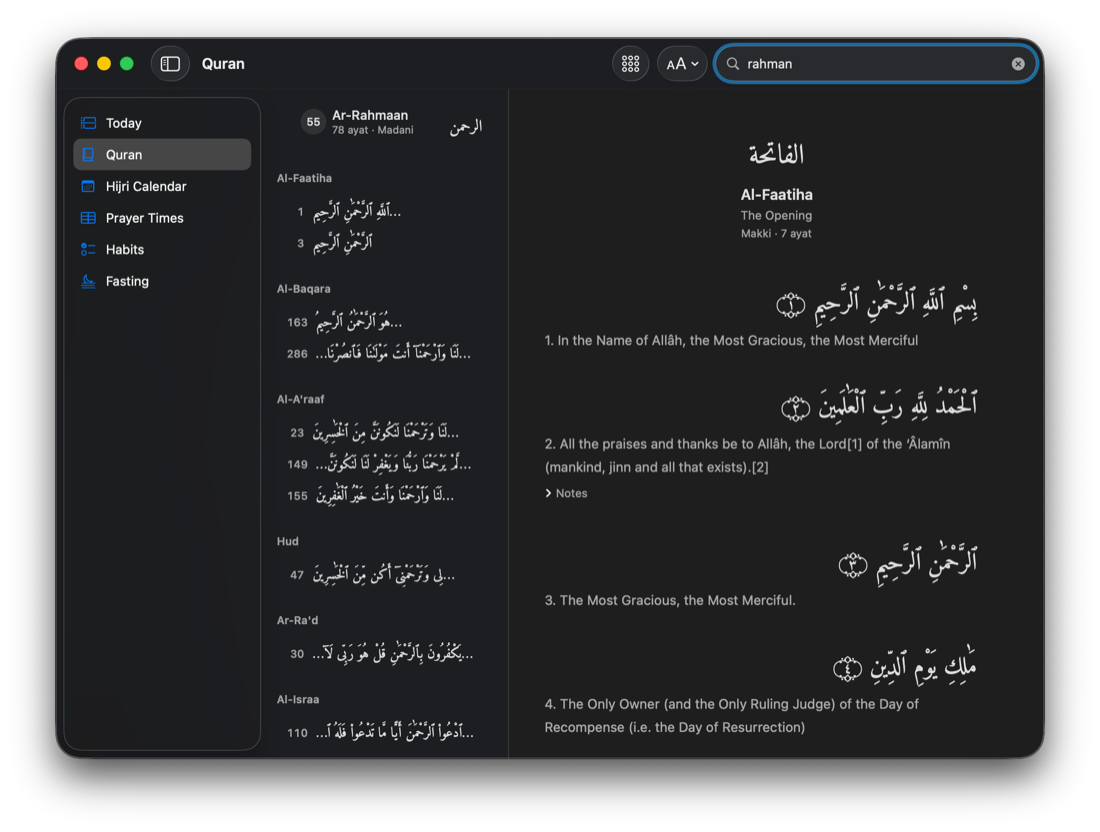
Her third letter was about the Habit Tracker: her cycle began at Fajr one day and ended at Dhuhr three days later, and the app could only be told about whole days. So an excusal is about a prayer now. Right-click any square in the grid, or any row in the menu-bar panel, and excuse that prayer alone, or the whole day, which is still one item away. Excuse a range with Excused from here… and a click on the last square, or from the Excused Prayers… form; either way you are told what it will write first. Your percentage counts only the prayers that were actually due, and a day carrying any excusal never breaks your streak. The Quran gained a transliteration line under the Arabic, off until you ask, and search reads it. The Friday Focus window now closes at Dhuhr, ⌘, opens Settings, and the Today tab draws busy calendar hours as a light weave. The details are in the changelog.
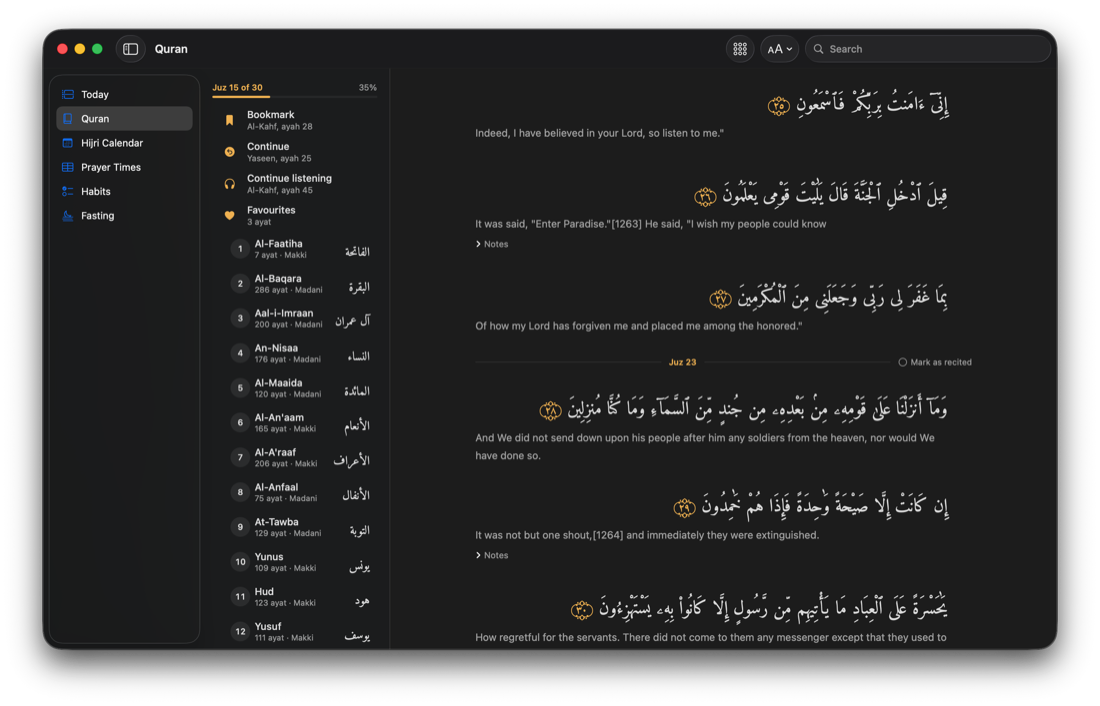
The customer whose letter became the Quran section wrote back, and 2.7 is her review, answered. A second voice — Sheikh Ali Al-Hudhaify, imam of the Prophet’s Mosque — joins Maher Al-Muaiqly, free like everything else and switchable mid-recitation. The thirty juz are marked through the reader, the player names the one you’re in, and “juz 23” in search jumps straight to it. Habits gains a khatmah record with two honest sources: a juz you recited is marked by hand, a juz you listened to counts only when every ayah has played to its end. Every ayah takes a written note now, gathered under My Notes. The recitation plays until you stop it — moving through the app no longer pauses it. And outside the Quran, a green day on the dhikr grid can finally be unmarked, so a mistaken tap is one tap from undone. The details are in the changelog.
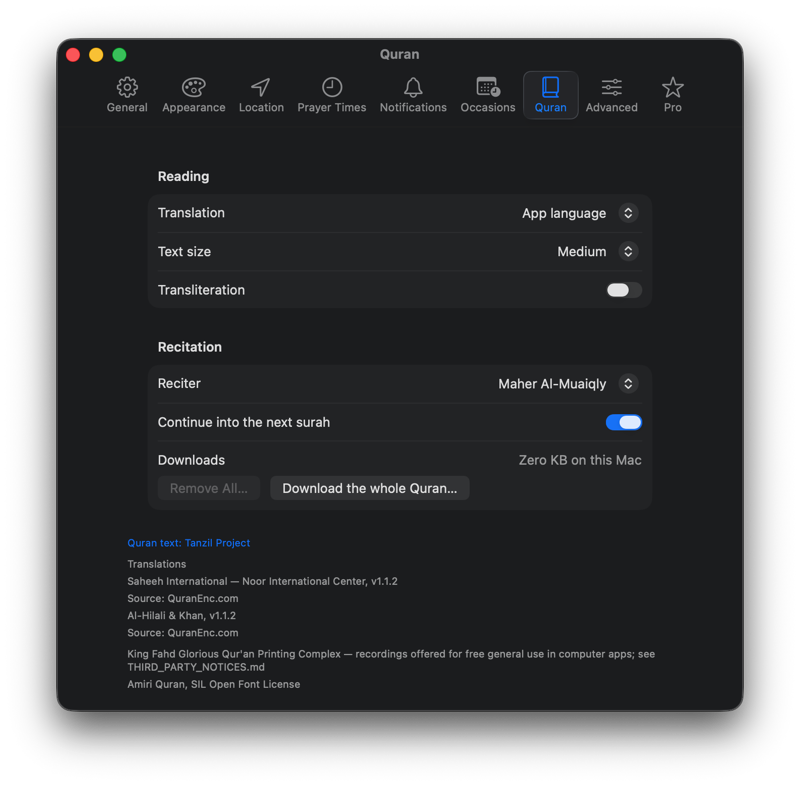
The Quran, free: all 114 surahs in Uthmani script, recitation by Sheikh Maher Al-Muaiqly that follows the text ayah by ayah, two English translations with the translators’ footnotes, search by number, name, meaning or the way a word sounds, favourites, a bookmark, and offline downloads for a surah or the whole Quran. Listening became a third habit mode, and the tasbeeh counter (2.5) gained custom targets, routines, and the meaning on the counter. The full story is in the changelog.
Because part of the figure is an estimate, and the square says so rather than hiding it. Until 2.11 Iqamah kept how many ayat you heard each day but not which ones, and ayat differ too much in length for a count of them to give letters. So the days before you updated are estimated at the Quran’s average of about 52 letters an ayah, and every ayah you hear from the update on is counted by its own letters. The ≈ goes on its own once the last of those earlier days has left the thirty the square covers. Either way the square says in sha Allah: the number is ours, and the reward is not.
Because that is what the discouragement rests on, and it is the one thing Iqamah cannot see. Two of the five rows are named this way, the one after Fajr and the one after Asr: there it is voluntary prayer that is discouraged, and only once you have prayed that window’s obligatory prayer — before that, you still owe it. The card does show you when each span runs, drawn from your own prayer times. What it will not do is print a clock time as though that were the moment the discouragement began, because the moment is when you prayed, and your Mac has no way of knowing it. The other three rows need no condition: while the sun rises, while it stands at its zenith and while it sets, prayer is not offered at all, whatever you have already prayed.
Either of them, in Settings › Prayer Times, under Today. They arrive switched on, because a switch you have to find first is a switch most people never find — and turning one off leaves nothing behind on the page. No greyed card, no empty row. The sunnah card also follows what you already keep: Duha and Tahajjud appear in it only if you have their rows turned on, and Asr has none at all, because the confirmed twelve do not include it.
Really free — the reading, the listening, and the downloads. Recitation streams from Iqamah’s own storage, so no third-party service learns what you listen to, and there is no account and no tracking here either. Downloading the whole Quran takes about a gigabyte of disk; the app shows the exact figure before it starts, shows its progress, and removes it all again from Settings › Quran whenever you like. The text comes from the Tanzil Project, the translations from QuranEnc.com, and the recitation is published by the King Fahd Glorious Qur’an Printing Complex — each named, with its version, inside the app.
The face of everything. A panel with a live sky replaces the dropdown menu (the classic menu stays on right-click). Five windows became one window with a sidebar. Settings became real toolbar-tab settings with a new Appearance pane. And two new records: excused days for prayer, and a full fasting record with a Ramadan make-up ledger.
Yes. It needed Pro in 1.x; in 2.0 it’s free, along with the fasting record. Excused days are marked in the habit tracker, and meeting a paywall at that moment would have been wrong. Pro keeps the Day Planner, the Hijri calendar, the prayer tables, the tasbeeh counter, widgets, calendar-aware planning and sync.
Nothing. Your prayer and dhikr history, settings and licence carry straight through — 2.0 is a free update. The Pro Tools menu is now called Tools, and its windows open as sections of the one Iqamah window.
On macOS 26 Tahoe and later the panel sits on Liquid Glass, like the system’s own menus, and so does the window’s sidebar — and since 2.11 the Quran’s recitation player, floating a little above the bottom of the window. Since 2.12 you can tint all three, gold or your Mac’s accent colour, from Subtle to Vivid, in Settings › Appearance › Liquid Glass. On macOS 14 and 15 the panel uses the familiar popover material, the player keeps its flat bar, and that section is not there, because there is no glass for it to change. Everything else is the same either way.
Only Pro’s planner reads calendars, only if you turn it on, and it reads when events start and end — never titles, guests or notes. Nothing leaves your Mac: no account, no analytics, no server. Sync, if you enable it, writes one visible file into a folder you choose in your own iCloud Drive, and your location is deliberately excluded from it.
Open Help › Diagnostics. One page says whether notifications are allowed, which location the times are for, which calculation method and school produced them, and what the next alert is and when. Anything that needs fixing has a button that opens the right place to fix it — and Contact Support sends that same report already written into the mail.
Open Iqamah, go to Settings › Pro and choose Recover License. Enter the email address you bought with and we will send your key and a link showing which Macs it is active on. If you no longer have Iqamah installed, start here.
Open the downloaded disk image and drag Iqamah to your Applications folder. The app is signed and notarized by Apple, so it opens without a security warning, and it keeps itself up to date from then on.
Not yet. Iqamah is available directly from this page today, with the same app, the same updates, and the same one-time purchase.